Resize PDF Pages (A4, US Letter & Custom Dimensions)
Standardize mixed-size PDFs or convert US Letter documents to ISO A4 (and back) directly in your browser. Preserves vector text sharpness with zero server uploads.
Sending a US Letter (8.5 x 11 inch) contract to an office in Europe or Asia that prints on ISO A4 (210 x 297 mm) often clips headers or leaves awkward margins. The same headache happens when you merge scanned receipts, PowerPoint slides, and portrait documents into one packet and end up with wildly mismatched page widths.
Print drivers can shrink pages on the fly, and desktop suites like Adobe Acrobat Pro Preflight offer deep prepress profiles with bleed boxes and CMYK color conversion for commercial print shops. When you simply need to normalize a PDF to A4, US Letter, US Legal, A3, A5, or exact custom dimensions before emailing or uploading it to a portal that rejects non-standard page sizes, a dedicated local resizer is much faster.
This tool reads your PDF inside a background Web Worker, reports the current Page 1 dimensions in both points and millimeters, and scales every page proportionally onto fresh target-size canvases using pdf-lib vector page embedding.
How to resize PDF pages locally
- Drop your PDF file into the box above. The worker inspects the document locally and displays the current page size in points (pt) and millimeters (mm).
- Select a standard paper preset (A4, US Letter, US Legal, A3, or A5) or choose Custom Dimensions to enter exact width and height in millimeters, inches, or PDF points.
- Pick Orientation (Auto preserves each page’s portrait or landscape orientation individually; Force Portrait or Force Landscape standardizes everything), Scaling Mode (Fit preserves aspect ratio with zero clipping; Fill covers the full sheet), and optional padding margin.
- Click Resize Pages & Download. The worker generates a brand-new vector PDF at your target dimensions and downloads it immediately.
Why vector embedPage scaling beats rasterizing pages
Some quick online resizers render each PDF page to a bitmap image and scale that image onto a new sheet. That approach destroys selectable text, breaks hyperlinks, inflates file size, and turns crisp 10-point fonts fuzzy when printed.
Our worker uses pdf-lib’s native embedPage() API inside pdf-js.worker.ts. Each source page is embedded as a Form XObject onto a newly sized destination page, then mathematically scaled and centered inside the available content box (target width and height minus your optional padding margin).
Because the original vector paths, fonts, and embedded images are transformed via a PDF affine matrix rather than rasterized into pixels, every character stays selectable and sharp at 1200 DPI print resolution. Auto orientation checks each page’s effective CropBox and rotation angle individually so landscape charts inside a portrait report do not get squished sideways.
For reference, standard ISO A4 measures 210 x 297 mm (595.28 x 841.89 pt), US Letter measures 8.5 x 11 inches (612 x 792 pt), US Legal measures 8.5 x 14 inches (612 x 1008 pt), A3 measures 297 x 420 mm (841.89 x 1190.55 pt), and A5 measures 148 x 210 mm (419.53 x 595.28 pt). Because PDF coordinates use 72 PostScript points per inch, our custom dimension input converts millimeters and inches with full floating-point precision before constructing each new page.
When resizing PDF page dimensions saves time
- Converting US Letter resumes, contracts, or invoices to ISO A4 for international clients and printers (or A4 to US Letter for US offices).
- Unifying mixed page sizes after combining screenshots, receipts, and Word exports into one single submission packet.
- Preparing handouts, booklets, or shipping labels at exact A5, A3, US Legal, or custom millimeter dimensions.
- Adding uniform white padding margins around edge-to-edge scans so binding punches or office printers do not clip text.
- Fixing oversized architectural or slide exports so every page scrolls at a consistent width in PDF viewers.
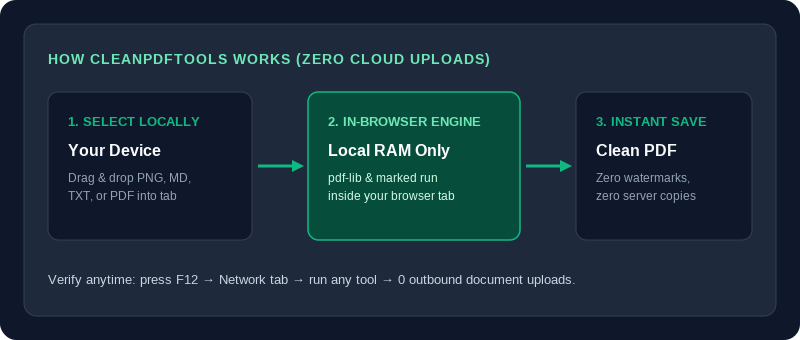
Page inspection and vector rescaling run 100% inside a local Web Worker. Check DevTools (F12 -> Network) to verify zero outbound uploads.
Frequently Asked Questions
Will resizing my PDF make the text blurry or unselectable?
No. We embed each source page as a vector Form XObject and apply a clean coordinate transform, so fonts and vector graphics stay sharp and text remains selectable.
What is the difference between Fit and Fill scaling?
Fit scales each page proportionally so 100% of the content fits inside the new paper size without cutting anything off (adding balanced margins if aspect ratios differ). Fill scales proportionally until the entire target page is covered, which may trim edges when converting between very different aspect ratios.
How does Auto orientation handle PDFs that mix portrait and landscape pages?
Auto inspects each page individually. Portrait pages map to the portrait orientation of your chosen preset (for example 210 x 297 mm for A4), while landscape pages map to landscape (297 x 210 mm).
What is the difference between Resize PDF and Crop PDF?
Crop PDF trims away unwanted outer whitespace or scanner borders from existing pages, reducing page dimensions. Resize PDF scales the entire page content onto a new standardized paper size such as A4 or US Letter.
Can I compress or clean metadata right after resizing?
Yes. Use the Next Step chaining bar under the result card to pass your resized PDF directly into Compress PDF, Crop PDF, or Metadata Remover via local browser memory.