HTML to PDF Converter (100% Local & Sandboxed)
Paste HTML markup or load a local .html file, inspect it safely inside a sandboxed preview pane, configure A4 or US Letter margins, and export a real vector PDF with zero uploads.
Developers, designers, and finance teams frequently generate invoices, email receipts, release notes, or structured reports as standalone HTML files. Turning that HTML into a clean PDF usually means either spinning up headless Chromium (Puppeteer or Playwright) on the command line or pasting proprietary HTML templates into a cloud converter.
Server-side headless browser APIs like DocRaptor, WeasyPrint, or Puppeteer services are genuinely better if you need automated webhook PDF generation from a backend database or need to fetch live remote web URLs with external authentication cookies. When you already have an HTML snippet or local .html file on your machine and just want a clean, selectable PDF without installing anything or uploading sensitive customer data, your own browser already contains a full layout engine.
This tool sanitizes your HTML locally, previews it inside a script-disabled sandboxed iframe so untrusted markup can never execute JavaScript, and generates a clean print-ready vector PDF using CSS @page rules for paper size, orientation, and margins.
How to convert HTML to PDF locally
- Paste your HTML markup into the editor on the left, or click Load local .html file to open a file directly from your computer.
- Select your target Paper Size (A4 or US Letter), Orientation (Portrait or Landscape), and Margin preset (Normal, Compact, or No Margins).
- Verify typography, tables, and spacing in the live sandboxed preview pane on the right.
- Click Export Vector PDF (Print Dialog), then choose "Save as PDF" as the destination in your browser print window to save a crisp vector PDF.
Why sanitized iframe preview + CSS @page beats screenshot converters
Many client-side HTML-to-PDF libraries (such as html2canvas wrappers) paint your DOM onto a giant raster image and slice it arbitrarily into pages. That creates blurry fonts, breaks text selection and copy-paste, disables clickable links, and frequently slices right through the middle of a table row.
Instead of rasterizing your HTML, CleanPDFTools runs our DOM sanitizer to strip unsafe script tags, event handlers, and dangerous URI schemes, renders the safe markup inside an isolated <iframe sandbox=""> preview (with scripts disabled), and injects standard CSS @page size and margin declarations when opening the clean export window.
Your browser’s native print-to-PDF compositor then outputs true vector text, sharp SVG/CSS borders, clean pagination, and working hyperlinks, all without transmitting a single byte of your HTML to any server. Note that because this runs 100% locally in your browser without a remote proxy server, it converts HTML code and local .html files rather than scraping arbitrary third-party URLs blocked by CORS.
If your HTML relies on external stylesheets or remote CDN images that require login cookies, inline those CSS rules or data URIs before loading the file so every visual element renders identically offline. For best table pagination across multiple pages, wrap column headers in <thead> so Chromium and Firefox repeat headers cleanly at the top of each printed page, and disable browser header/footer URLs in the print dialog when exporting formal client invoices.
Practical use cases for local HTML to PDF export
- Turning local HTML invoice templates, billing statements, or client quotes into crisp vector PDFs without exposing customer details.
- Archiving saved HTML email receipts, order confirmations, or support transcripts for expense reports.
- Exporting technical documentation fragments, changelogs, or styled HTML tables for stakeholder sign-off.
- Testing print CSS (@page margins, portrait vs. landscape table fit) locally before deploying a template to production.
- Converting private HTML notes or resumes without installing wkhtmltopdf, WeasyPrint, or Puppeteer.
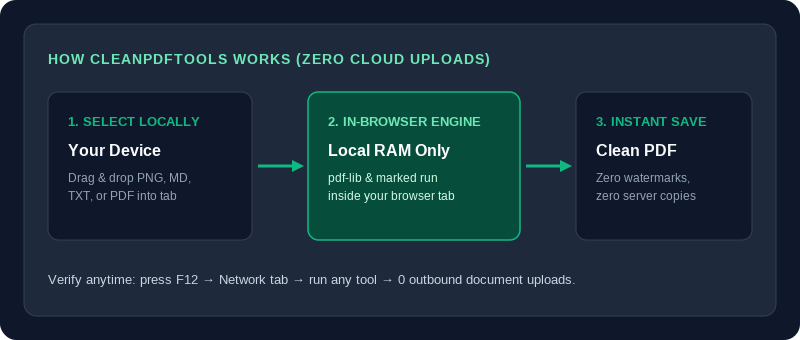
Your HTML markup is sanitized and rendered exclusively inside your browser tab. Open DevTools (F12 -> Network) to confirm zero bytes are posted to any server.
Frequently Asked Questions
Why does this tool sanitize my HTML and use a sandboxed iframe?
If you open an HTML file downloaded from an email or third-party export, it could contain embedded tracking scripts or unsafe event handlers. Sanitizing the markup and previewing it inside a script-disabled sandboxed iframe protects your browser session.
Can I paste a live website URL to convert it to PDF?
No. Because this tool runs 100% locally in your browser with zero backend proxy servers, browser CORS security rules prevent fetching arbitrary external websites. Instead, paste the HTML source or load a saved local .html file.
Will text and links in the exported PDF be selectable?
Yes. Exporting through the browser vector print dialog produces real vector PDF text and clickable hyperlinks rather than a flat screenshot.
What if my browser blocks the export window?
If a pop-up blocker prevents the print window from opening, we display a clear notice. Allow pop-ups for cleanpdftools.com and click Export again.
Can I control A4 vs. US Letter and landscape layout?
Yes. Choose A4 or US Letter, Portrait or Landscape, and Normal, Compact, or No Margins right in the toolbar; those settings are injected directly into CSS @page rules.