Reorder PDF Pages (Visual Drag, Delete & Merge)
See every page as a crisp thumbnail, drag pages into any order, delete blanks or duplicates, and append additional PDF files together without uploading anything.
Scanners love feeding pages out of order, inserting blank backs, or splitting a single packet into three separate PDF files. Fixing that mess on a typical free PDF website means uploading every document to a remote server, waiting through an upload bar, and hitting a 2-task daily limit on Smallpdf or a 50 MB / 3-task-per-hour ceiling on Sejda.
Desktop suites like Adobe Acrobat Pro handle massive 500-page binders well and offer deep bookmark editing, which justifies their subscription for full-time legal or publishing teams. For everyone else who just needs to move page 4 ahead of page 2, drop a stray cover sheet, and append an invoice PDF onto the end of a report, paying a monthly fee or uploading private paperwork to the cloud makes no sense.
This workbench renders a lazy-loaded thumbnail grid of your PDF right inside your browser using pdf.js, lets you drag cards to rearrange them, delete unwanted pages in one click, and append extra PDFs into the exact same grid before assembling the final file in a dedicated Web Worker.
How to reorder, delete, and merge PDF pages locally
- Drop your starting PDF into the box above. Thumbnail cards appear automatically and render lazily as you scroll so even long documents stay smooth.
- Drag and drop any page card to a new slot in the grid (or use the quick left/right arrow controls on each card for precise one-step moves on touchscreens and keyboards).
- Click the × button on any blank or unwanted page to remove it, or click Add / Append PDFs in the sidebar to load additional documents right into the same workspace and interleave their pages freely.
- Click Save Reordered PDF. Our background Web Worker copies each page in your exact visual sequence using pdf-lib and triggers an immediate local download.
Lazy concurrency-limited rendering and lossless page assembly
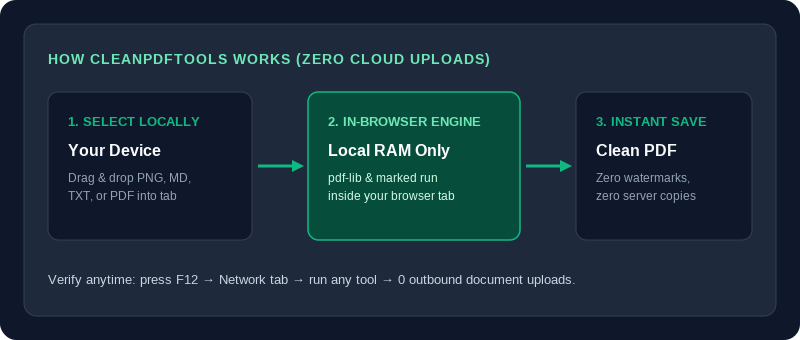
Rendering 60 PDF pages all at once on a phone or laptop will freeze a browser tab. To keep scrolling responsive, this grid pairs an IntersectionObserver with a concurrency-limited render queue capped at three simultaneous canvas draws via pdfjs-dist. Only the thumbnails near your viewport are rasterized for preview, while off-screen pages wait quietly until you scroll to them.
When you click Save Reordered PDF, we never screenshot or re-compress those low-res preview thumbnails into your output file. Instead, we send your original source PDF ArrayBuffers and the final page sequence plan to our Web Worker via zero-copy Transferable buffers. Inside the Worker, pdf-lib creates a fresh PDFDocument and uses copyPages to transfer the exact native vector objects, embedded fonts, hyperlinks, and image streams from each source file in your chosen order.
Because multiple source files are tracked by index and color-coded with file badges in the grid, you can merge three separate PDFs and interleave pages from File 2 directly between pages of File 1 in a single pass, with zero quality loss. If you realize after rearranging that a page also needs a signature or margin trim, the Next Step bar passes your finished PDF straight into our Sign PDF or Crop PDF tool through local IndexedDB memory without downloading and re-uploading.
Common page organization tasks solved in seconds
- Fixing out-of-order duplex scans and deleting blank backside pages before submitting a packet.
- Merging a cover letter, resume, and portfolio PDF into one cleanly ordered job application file.
- Inserting an updated addendum or signed signature page into the middle of an existing contract PDF.
- Reversing an entire backwards-scanned document with a single click using the Reverse Order button.
- Assembling monthly accounting packets by appending multiple vendor receipts and invoices locally without exposing financial records online.
Every source PDF you drop or append stays strictly in local browser memory. Even when merging multiple files, zero bytes leave your device.
Frequently Asked Questions
Can I merge multiple PDF files and reorder their pages together?
Yes. After loading your first PDF, click Add / Append PDFs in the right panel to add as many extra PDF files as you need. Every page appears in one unified grid with a file badge so you can drag pages across files into any sequence.
Does reordering or merging reduce text sharpness or image resolution?
No. The thumbnails are used strictly for visual preview. When you export, the Web Worker copies the original vector page objects directly from your source PDFs via pdf-lib with zero re-compression.
What if I accidentally delete a page from the grid?
Click Undo Last Delete in the sidebar to restore the removed page immediately, or click Reset Order to return all loaded files to their original page sequence.
Does this work with rotated or mixed-size PDF pages?
Yes. Each copied page retains its original dimensions (such as mixing US Letter, A4, and landscape slides) and its native /Rotate orientation.
Is there a maximum file size or page count limit?
There is no artificial server cap. Lazy thumbnail rendering keeps large documents smooth, so the only practical ceiling is your device available browser RAM.