Redact PDF Permanently (True Text Destruction, Zero Uploads)
Draw blackout boxes over SSNs, account numbers, or private clauses. Redacted pages are re-rendered at high DPI so the underlying text is permanently gone.
This browser tool permanently destroys text on redacted pages via high-DPI raster replacement. For law firms processing hundreds of scanned exhibits with automated regex PII search and Bates numbering, desktop suites handle batch runs faster.
Affiliate disclosure: External partner links may earn us a commission at no extra cost to you. CleanPDFTools web utilities remain free.
Drawing a black rectangle over text in a standard PDF viewer or annotation app is one of the most dangerous privacy mistakes you can make. In a PDF file, an annotation or vector shape simply sits in a visual layer on top of the original text stream. Anyone who presses Ctrl+A, copies the page, or runs pdftotext can still read every character hiding underneath that black box.
Adobe Acrobat Pro handles permanent redaction well on the desktop, but it requires a paid monthly subscription. Free cloud PDF editors ask you to upload the exact unredacted bank statement, medical record, or legal exhibit you are trying to protect to a remote server first. Uploading a sensitive file to a third party just to black out a Social Security number defeats the entire point of redaction.
This tool performs true redaction 100% locally inside your browser tab. Every page where you draw one or more blackout rectangles is rendered to pixels at 200 or 300 DPI via pdf.js, the blackout regions are burned directly into the image bitmap, and that clean raster page replaces the original page in a brand new PDF assembled inside a background Web Worker. Untouched pages stay crisp vectors, and hidden Info and XMP metadata can be stripped automatically on export.
How to permanently redact a PDF locally
- Drop your PDF into the drop zone above (or click to choose a local file). Nothing leaves your computer.
- Navigate to any page containing sensitive information using the page controls above the preview canvas.
- Click and drag directly on the page preview to draw one or more blackout rectangles over names, SSNs, addresses, or dollar figures. Use Undo, Clear Page, or individual delete buttons in the sidebar to adjust boxes.
- Choose your rasterization DPI (200 DPI for balanced file size or 300 DPI for crisp small print) and keep "Auto-strip PDF Info & XMP metadata" checked if you also want author and edit history removed.
- Click Apply True Redaction & Download. Only pages with redaction boxes are rasterized and rebuilt; all untouched pages remain original selectable vectors.
Why fake black boxes leak data and how true raster redaction prevents it
A PDF page is not a flat picture. It is a sequence of drawing instructions stored in a content stream, referencing embedded font tables and positioned text runs (Tj and TJ operators). When someone uses a basic markup tool or Preview annotation to paint a black rectangle on top of a line of text, the PDF writer simply appends a rectangle operator to the end of the content stream or attaches an /Annots dictionary entry. Visually, the text looks covered. Structurally, every single letter of the secret string is still sitting untouched in the file bytes.
Real-world court filings, government disclosures, and corporate exhibits have repeatedly leaked confidential information because of fake redactions. A recipient only needs to drag a text cursor across the black bar, copy, and paste into Notepad to recover the hidden names or figures. Worse, search engines and e-discovery indexers read the underlying text stream directly and ignore black shapes altogether.
To eliminate that risk inside the browser without requiring server-side software, our Redact PDF engine takes a destructive page-replacement approach. For every page that contains at least one redaction rectangle, pdf.js renders that page onto an offscreen canvas at your chosen high DPI (200 or 300 DPI). Before encoding the image, the controller paints solid opaque #000000 rectangles directly over the canvas pixels with a 1-pixel outward bleed so even anti-aliased edges of adjacent glyphs are erased. The resulting PNG bitmap is passed via zero-copy Transferable ArrayBuffer to our background Web Worker (pdf-js.worker.ts).
Inside the worker, pdf-lib creates a fresh PDFDocument from scratch. For each redacted page, it adds a brand new blank page matching the original physical dimensions in points and draws only the flattened PNG bitmap onto it. Zero original content streams, zero font subsets, zero text operators, and zero interactive annotations from that page are ever copied into the output file. For every page you did not touch, the worker copies the original vector page directly so multi-page contracts stay sharp, searchable, and lightweight. Finally, when metadata stripping is enabled, the worker clears standard Info dictionary keys (Title, Author, Subject, Creator, Producer, Keywords) and deletes the hidden XMP Metadata stream from the PDF catalog.
High-stakes scenarios where true browser-local redaction matters
- Blacking out Social Security numbers, routing numbers, or account balances on bank statements and tax returns before sending proof of income to a landlord or lender.
- Removing personal phone numbers, home addresses, or client names from contracts and invoices before sharing redacted samples with prospective customers.
- Sanitizing medical records, insurance claims, or HR incident reports without ever transmitting unredacted PII across a network.
- Preparing court exhibits, FOIA responses, or legal discovery documents where opposing counsel will inspect the file for leftover hidden text.
- Combining true redaction with our Rust WASM Compress PDF or PDF Metadata Remover via one-click local memory handoff right after export.
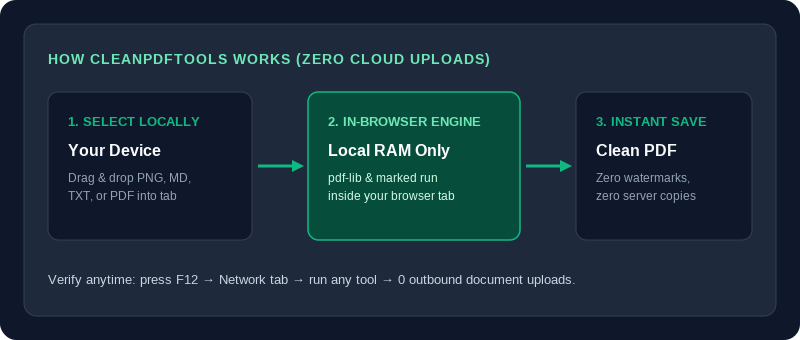
Verify both privacy and text destruction yourself: open DevTools (F12 -> Network tab) to confirm 0 bytes are uploaded, then open the downloaded PDF, press Ctrl+A and Ctrl+C on the redacted page, and paste into a plain text editor. The redacted page will yield zero hidden characters.
Frequently Asked Questions
Can someone copy-paste or extract text from underneath the black boxes?
No. Unlike annotation tools that place a black rectangle on top of existing text, this tool renders every redacted page to pixels, burns the black boxes into the bitmap, and builds a new page containing only that flattened image. The original text stream on redacted pages is permanently destroyed.
What happens to pages where I did not draw any redaction boxes?
Untouched pages are copied directly as original vectors. Their text stays selectable, searchable, and razor sharp, and your file size does not bloat unnecessarily on long documents.
Does redacting a PDF also remove hidden metadata like the author name?
Yes. The "Auto-strip PDF Info & XMP metadata" option is enabled by default, clearing standard Info fields and deleting the catalog XMP Metadata stream during export. You can also chain directly into our Rust WASM PDF Metadata Remover for a full byte-level audit.
Should I choose 200 DPI or 300 DPI for redacted pages?
200 DPI keeps standard office contracts and bank statements crisp while producing moderate file sizes. Pick 300 DPI if the redacted page contains dense footnotes, small spreadsheet tables, or fine legal print that will be printed on paper.
Does CleanPDFTools ever upload my unredacted PDF to a server?
Never. Both pdf.js rendering and pdf-lib assembly execute 100% locally inside your browser tab and background Web Worker. You can even turn off Wi-Fi after loading the page and still redact files normally.