Compress PDF Locally (Powered by Rust & WASM)
Shrink bloated PDFs right inside your browser tab using a compiled Rust WebAssembly kernel. See exact before-and-after byte savings with zero cloud uploads and no daily task caps.
Our Rust WASM engine optimizes streams and strips bloat losslessly so text and images stay crisp. If you have a 100 MB raw camera scan that requires lossy JPEG image resampling or desktop batch automation, a dedicated optimizer is the better fit.
Affiliate disclosure: External partner links may earn us a commission at no extra cost to you. CleanPDFTools web utilities remain free.
Most free online PDF compressors upload your tax returns, signed leases, or pitch decks to a remote server, cap you at two tasks per day (like Smallpdf) or 50 MB and three tasks per hour (like Sejda), and ask you to trust a server-side auto-delete timer. Worse, many browser-based tools download a 10+ MB Ghostscript WebAssembly bundle on the main thread that freezes your tab for half a minute before compressing a single page.
Cloud compression services and desktop apps like Adobe Acrobat Pro PDF Optimizer still have a clear advantage when you need aggressive lossy JPEG downsampling on 200 MB raw photo scans (for instance, resampling 600 DPI camera images down to 120 DPI). When your PDF is bloated by uncompressed content streams, incremental edit leftovers, redundant Adobe PieceInfo blocks, embedded page thumbnails, or loose zlib streams, you do not need to upload anything to shrink it.
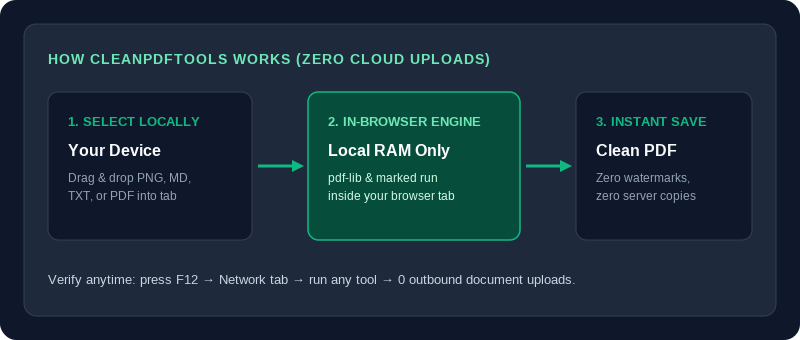
CleanPDFTools compiles a purpose-built Rust PDF compression kernel to WebAssembly (~140 KB gzipped) and runs it inside a dedicated background Web Worker. Your file stays in local RAM, your UI never freezes, and the result card shows the exact original size, compressed size, percentage saved, re-deflated stream count, and pruned object count.
How to compress a PDF locally with Rust WASM
- Drop your PDF file into the drop zone above or click to pick one from your computer. The Rust WASM worker validates the document structure and page count locally.
- Choose Strong Deep Clean (maximum zlib level 9 re-deflation plus orphan pruning, thumbnail removal, and private PieceInfo stripping) or Balanced Lossless (level 6 stream re-deflation and orphan pruning while preserving private app blocks).
- Keep the Strip Info & XMP metadata checkbox enabled if you also want to drop hidden XML metadata packets for extra byte savings.
- Click Compress PDF (Rust WASM) & Download. Review the side-by-side size reduction summary, then either download again or send the compressed file straight to Metadata Remover or Sign PDF via local IndexedDB handoff.
How lossless Rust WASM stream compression works under the hood
PDF files accumulate hidden weight over time. Every time someone saves an incremental edit in a desktop editor, old object revisions remain stranded inside the file. Design exports from Illustrator, InDesign, and PowerPoint frequently embed megabytes of private /PieceInfo editing state, page thumbnail previews (/Thumb), and uncompressed or lightly compressed content streams.
When you click Compress, your browser transfers the raw ArrayBuffer with zero-copy Transferable messaging to our dedicated pdf-wasm.worker.ts thread. Inside WebAssembly, the Rust kernel parses the full object table, removes unreachable orphan objects and zero-length streams, optionally strips /PieceInfo, /Thumb, /Info, and /Metadata streams, and iterates through every PDF stream dictionary.
For uncompressed streams larger than 64 bytes and standard FlateDecode streams without custom predictors, the kernel re-deflates the payload with pure-Rust zlib (flate2) at your chosen level and replaces the stream only when the new bytes are strictly smaller. Already-compressed image streams such as DCTDecode (JPEG), JPXDecode (JPEG 2000), and JBIG2Decode are left untouched so your photos and diagrams never suffer generation loss. If a PDF is already tightly optimized and re-compression cannot reduce its size further, the worker honestly reports 0% reduction and returns your original file unchanged instead of inflating it.
Best workflows for local Rust WASM compression
- Trimming email attachments below corporate 10 MB or 25 MB gateway limits without uploading confidential client documents.
- Stripping bloated Illustrator, InDesign, or PowerPoint PieceInfo blocks and incremental save history before uploading proposals to procurement portals.
- Compressing merged multi-file PDFs right after combining pages in our Reorder & Merge PDF Pages tool.
- Optimizing exported resumes, academic papers, and financial statements while keeping 100% crisp vector text and lossless image sharpness.
- Working offline on flights, trains, or air-gapped corporate networks once the Service Worker has cached the tiny .wasm module.
Verify zero uploads in DevTools (F12 -> Network tab): the only request is the one-time static fetch of /wasm/cleanpdf_wasm_bg.wasm from this origin, followed by zero outbound file traffic.
Frequently Asked Questions
Does compressing a PDF here reduce text clarity or blur images?
No. Our Rust WASM kernel performs lossless structural optimization: it prunes orphan objects, removes hidden bloat (PieceInfo, thumbnails, optional metadata), and re-deflates streams with stronger zlib compression. Text stays 100% vector and existing JPEG images are never re-encoded.
Why did my already-compressed PDF show 0% saved?
If a PDF consists mostly of already-compressed JPEG photos or was recently exported with tight object streams, lossless re-deflation cannot shrink it further without downsampling image pixels. When that happens, we tell you honestly and keep your original bytes unchanged rather than returning a larger file.
How large is the Rust WASM module I download?
The compiled cleanpdf_wasm_bg.wasm binary is roughly 140 KB gzipped (less than one-tenth of typical multi-megabyte WASM PDF engines) and is cached locally by the Service Worker for instant offline reuse.
Is there a file size cap or hourly limit?
No artificial caps or paywalls. Because compression runs on your own CPU in a Web Worker, practical limits depend only on your device memory.
Can I compress a password-protected PDF?
No. Encrypted PDFs must be unlocked before their internal streams and cross-reference tables can be rewritten. The worker detects encryption cleanly and prompts you to unlock the file first.