PDF Word Counter (100% Local & CJK-Aware)
Drop any PDF to get exact total words, character counts (with and without spaces), reading and speaking time estimates, top keywords, and a per-page breakdown—zero uploads.
| Page | Words | Chars (no spaces) | Lines |
|---|
Checking the word count of a PDF should not require copying 40 pages into Microsoft Word (and accidentally pasting headers, page numbers, or broken ligatures) or uploading an unpublished manuscript, legal brief, or grant application to an online counter.
Dedicated writing suites like Microsoft Word, Google Docs, and Scrivener give you live word counts while you draft, and they remain the right place to edit your source manuscript. Once a document is already exported to PDF—for example, a conference submission, translation quote, student thesis, or client report—you need a fast way to audit exact word and character totals directly from the PDF.
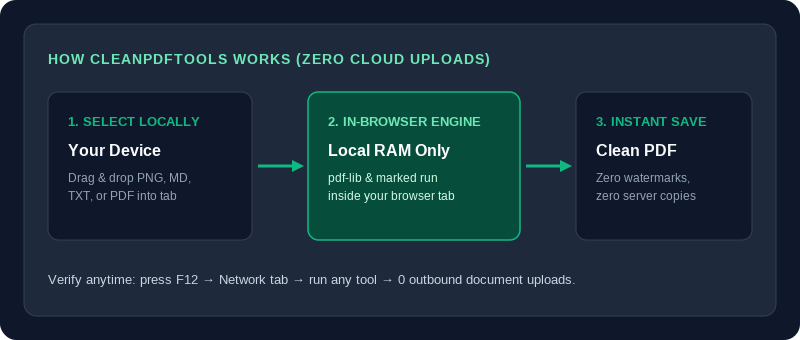
CleanPDFTools extracts the embedded text layer locally via pdf.js and computes all statistics inside a background Web Worker. You get total words, characters with and without spaces, estimated reading and speaking times, top recurring keywords, and an exportable per-page CSV table without a single byte leaving your device.
How to count words in a PDF locally
- Drop your PDF into the box above or click to pick a file from your device.
- Your browser extracts text page by page locally via pdf.js (releasing per-page memory immediately so 100+ page documents stay fast) and runs the counting pass in a background Web Worker.
- Review total words, characters (with and without spaces), page count, estimated reading time (~225 words/min), speaking time (~130 words/min), top keywords, and the per-page breakdown table.
- Click Copy Report to copy a clean Markdown summary to your clipboard, or click Export Word Count (.csv) to download the per-page table for spreadsheets and translation quotes.
How local text extraction and CJK-aware tokenization work
Naive PDF word counters split raw strings on whitespace only. That breaks on two common real-world cases: PDFs where adjacent words sit in separate X/Y text spans without a literal space character, and Chinese, Japanese, or Korean (CJK) documents that do not put spaces between words.
Our extractor (shared with PDF to Markdown and Compare PDF Files) reconstructs visual lines from pdf.js text item coordinates, inserting spaces accurately whenever horizontal gaps exceed a proportional font-size threshold. The worker then counts Latin/alphanumeric words alongside individual CJK ideographs so mixed English and Chinese/Japanese/Korean PDFs produce accurate totals instead of lumping an entire paragraph into one giant token.
If a PDF is a flat image scan with no embedded text layer, the counter detects 0 selectable words and displays an explicit warning rather than pretending the document is empty, letting you know OCR is required first.
We also compute a top-15 keyword frequency breakdown by filtering out common short English stop words and standalone numbers. That gives editors, translators, and researchers a quick sanity check on repeated terminology across long reports. Because all tokenization and frequency sorting happen off the main thread in pdf-js.worker.ts, scrolling and copying stay smooth even on 200-page academic dissertations or dense technical manuals. When you export the CSV breakdown, every page row matches the exact page number shown in standard PDF viewers so you can reconcile chapter or section budgets immediately.
Where local PDF word counting is most useful
- Verifying strict journal, grant, scholarship, or academic thesis word limits directly on the final exported PDF.
- Estimating translation or proofreading quotes with exact word counts, character counts without spaces, and per-page CSV breakdowns.
- Checking estimated reading and speaking durations before presenting a whitepaper, keynote script, or board memo.
- Auditing keyword density and top recurring terms in resumes, proposals, or SEO content drafts.
- Counting words in confidential legal briefs, unpublished books, or internal HR reports without uploading them to third-party servers.
Unpublished manuscripts and client briefs stay strictly in local browser memory. Verify zero outbound uploads anytime in DevTools (F12 -> Network tab).
Frequently Asked Questions
Does this PDF word counter work on scanned image PDFs?
No. Like all text-layer PDF counters, it reads selectable embedded text. If your PDF is a flat scan (such as a photo of paper pages), the tool will warn you that 0 selectable words were found so you know to run OCR first.
How does it count Chinese, Japanese, or Korean (CJK) characters?
Our worker uses a CJK-aware tokenizer that counts each CJK ideograph individually alongside standard space-delimited Latin words, so bilingual or CJK PDFs are counted accurately.
How are reading time and speaking time calculated?
Reading time uses a standard silent adult reading pace of 225 words per minute, while speaking time uses a clear presentation pace of 130 words per minute (rounded up to the nearest minute).
Can I export the per-page word count to Excel or Google Sheets?
Yes. Click Export Word Count (.csv) to download a clean CSV file with Page, Words, Characters (no spaces), and Lines columns plus a Total row.
Is there a page limit for large PDFs?
No artificial page cap. Because pdf.js cleans up each page’s internal cache immediately after reading it, counting words in 100+ page reports or books stays fast and memory-safe inside your browser.