PDF to Markdown Converter (100% Local in Your Browser)
Extract structured Markdown headings, lists, and paragraphs from any text-based PDF directly inside your browser tab, ready for Obsidian, Notion, GitHub, or LLM prompts.
Copying text straight out of a PDF viewer usually leaves you with broken line wraps, missing headings, and glued-together list items. If you are feeding technical documentation into an LLM context window, importing research notes into Obsidian or Notion, or migrating legacy specs into a Git repository, cleaning that raw text by hand wastes hours.
Cloud PDF-to-Markdown APIs and web converters solve the formatting problem, yet they ask you to upload internal manuals, client briefs, or unpublished papers to a remote server. Many also cap free usage at a handful of pages per day or require an API key before you can test a single file. Dedicated server-side OCR pipelines like Marker or LlamaParse are genuinely stronger on multi-column scanned academic papers with complex LaTeX equations, because they run GPU vision models. For everyday digital PDFs that already contain a text layer, however, you do not need a remote GPU or an account.
This tool parses your PDF locally inside your browser using Mozilla pdf.js (pdfjs-dist). It reads character coordinates and font metrics page by page, reconstructs headings, ordered and unordered lists, and unwrapped paragraphs, and gives you a live rendered preview, one-click clipboard copy, and an instant .md download with zero bytes uploaded.
How to convert a PDF to Markdown locally
- Drag and drop any text-based PDF into the workbench above, or click to select a local file from your device.
- Wait a moment while pdf.js reads the text layer page by page inside your browser memory, tracking live extraction progress.
- Toggle the page separator switch on or off depending on whether you want explicit horizontal rules and page markers between pages, then inspect either the raw Markdown or the live rendered preview.
- Click Copy Markdown to paste directly into ChatGPT, Claude, Obsidian, or VS Code, or click Download .md to save the file locally.
How browser-side structure reconstruction works (and its honest limits)
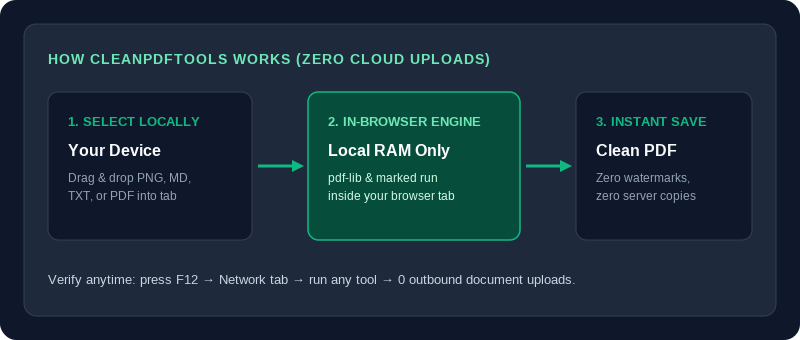
A PDF file does not store semantic Markdown tags like H2 or bullet lists. Under the hood, a PDF stores positioned text runs with X/Y coordinates, font names, and transformation matrices. When you drop a file here, our extractor pulls every text item from each page via pdfjs-dist, groups items that share the same baseline Y coordinate into logical lines, and sorts runs left to right by X offset while inserting spaces only where the horizontal gap exceeds a normal kerning threshold.
Once lines are assembled, the parser calculates the median body font size across the whole document. Short lines rendered significantly larger than the median body size are promoted to Markdown headings (#, ##, or ###) proportional to their scale ratio. Lines beginning with standard bullet glyphs (such as round bullets, hyphens, or dashes) normalize into clean Markdown dash lists, while numbered prefixes normalize into ordered lists. Consecutive body lines with tight vertical spacing merge back into flowing paragraphs, stripping awkward mid-sentence hard wraps.
Because this parser runs deterministically on the embedded PDF text layer without cloud OCR, it is fast and completely private, yet it has one clear boundary: if a PDF is a flat camera scan with zero selectable text, there is no text stream to extract. When our parser detects zero extractable characters, it warns you upfront instead of handing you an empty file.
Practical workflows where local PDF to Markdown saves time
- Preparing clean, low-token Markdown context from product specs, API guides, or policy PDFs before pasting into local or cloud LLMs and RAG pipelines.
- Importing exported reports, whitepapers, or course syllabi into Markdown-first knowledge bases like Obsidian, Logseq, Notion, or Hugo.
- Pulling clean text out of vendor documentation or RFCs so you can store, search, and diff them inside a Git repository.
- Converting internal legal or HR handbooks into editable Markdown without uploading confidential company documents to third-party conversion APIs.
- Separating long multi-page PDFs with optional page markers so you can trace every extracted quote back to its exact source page number.
Open DevTools (F12), switch to the Network tab, and drop a PDF into the converter. After the local pdf.js chunk loads once, extraction runs completely offline with zero outbound file uploads.
Frequently Asked Questions
Does this PDF to Markdown converter upload my file to a server?
No. Text extraction and Markdown formatting run 100% inside your browser tab using pdfjs-dist. Your document bytes stay in local device memory and are cleared when you close or refresh the page.
Why does the output look empty on a scanned PDF?
Scanned PDFs store flat page images rather than embedded text characters. Because this tool reads the native PDF text layer locally without sending images to a cloud OCR server, scanned documents require an OCR pass first before converting to Markdown.
What does the page separator toggle do?
When enabled, the converter inserts a Markdown divider and page header between each extracted PDF page. Turning it off produces a single continuous Markdown document without page breaks, which is often cleaner for Notion imports or LLM prompts.
How are headings and lists detected from a PDF?
The parser compares each line font height against the document median body font size to assign #, ##, and ### heading levels, and detects common bullet symbols and numbered prefixes to emit standard Markdown lists.
Is there a page count or daily usage limit?
No. Unlike hosted converters that limit free users to 2 or 3 files per day, processing happens on your own CPU and RAM, so you can convert as many PDFs as your device memory comfortably handles.